

Can someone who's sync is not screwed up w the update pull up your thermostat on your screen and show a picture with the actual numbers. I'm trying to gauge what the actual temperatures are based on the white line and I am having trouble finding any photographs online.
You are using an out of date browser. It may not display this or other websites correctly.
You should upgrade or use an alternative browser.
You should upgrade or use an alternative browser.
Thermostat gauge photo
- Thread starter SuperJ356
- Start date

Are you not aware that the set temperature is also located on the infotainment screen and HUD, if you have a HUD?
You should be able to still see it in the top left (and right if you've got it set to dual) part of the screen. Mine shows up still without issue in those locations, just lost it on the pop up in the middle when the temp is adjusted.
Are you not aware that the set temperature is also located on the infotainment screen and HUD, if you
For Some reason, I don't have numbers on top if infotainment. I will check HUD tho.You should be able to still see it in the top left (and right if you've got it set to dual) part of the screen. Mine shows up still without issue in those locations, just lost it on the pop up in the middle when the temp is adjusted.
______________________________
Kauffman1974
New member
- Joined
- Sep 3, 2021
- Messages
- 28
- Reaction score
- 9
- Points
- 3
I don’t have those numbers in the top left/right of the infotainment screen or the HUD either. No idea why, seems some do and some don’t so anyone with a picture that still has their’s working would be helpful. Thanks!For Some reason, I don't have numbers on top if infotainment. I will check HUD tho.
Not having the numbers on the top left of IS or HUD is a new one. Man, they just can't get it right.
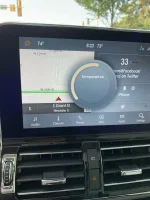
In this pic you can see I had 74° set. You can see the arc position.
______________________________
Yeah I don't have either of those options. It's a shame I do not have a low trim Navigator either I have pretty much everything I need short of the Black Label. Nonetheless if anyone does have a photograph of this screen but with the numbers that would be great this way I can just gauge what the line actually is at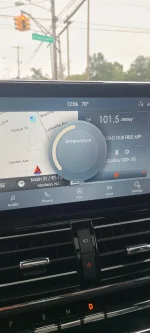
I don’t have those numbers in the top left/right of the infotainment screen or the HUD either. No idea why, seems some do and some don’t so anyone with a picture that still has their’s working would be helpful. Thanks!
Hi Kauffman. Just a long shot here: Is the climate control system turned off at the moment? If the climate control system is turned off, the temperature settings at the top of the SYNC screen probably would not display.
As I said, a long shot. Good luck.
Last edited:
From my pic above, I would surmise you have 72° or 73° set.Yeah I don't have either of those options. It's a shame I do not have a low trim Navigator either I have pretty much everything I need short of the Black Label. Nonetheless if anyone does have a photograph of this screen but with the numbers that would be great this way I can just gauge what the line actually is atView attachment 11460
______________________________
Kauffman1974
New member
- Joined
- Sep 3, 2021
- Messages
- 28
- Reaction score
- 9
- Points
- 3
Appreciate that pic, looks like the center point is probably 73 degrees.From my pic above, I would surmise you have 72° or 73° set.
Nope, turned on. We have a 2020 Navigator (and 2021 Aviator) so not sure if it has to do with the build date or trim level (ours is a Reserve II)Hi Kauffman. Just a long shot here: Is the climate control system turned off at the moment? If the climate control system is turned off, the temperature settings at the top of the SYNC screen probably would not display.
As I sai, a long shot. Good luck.
Last edited:
You bet.Appreciate that pic, looks like the center point is probably 72 degrees.
Nope, turned on. We have a 2020 Navigator (and 2021 Aviator) so not sure if it has to do with the build date or trim level (ours is a Reserve II)
I drove a 2020 loaner, 2 of them actually. They both had the temp displays in the infotainment screens and HUDs. Maybe a master reset or Sync system reboot is necessary. I would definitely take to the dealer if those don't work. Maybe your APIM needs an update or replacement.
Kauffman1974
New member
- Joined
- Sep 3, 2021
- Messages
- 28
- Reaction score
- 9
- Points
- 3
I’ll have the dealer check it out next time I’m there. Thx.You bet.
I drove a 2020 loaner, 2 of them actually. They both had the temp displays in the infotainment screens and HUDs. Maybe a master reset or Sync system reboot is necessary. I would definitely take to the dealer if those don't work. Maybe your APIM needs an update or replacement.
@Kauffman1974, prior to now, and the temp adjustment display being "broken", how did you previously know what temperature was set? Would you always toggle the temp adjustment button to pull up the temp in the middle of the infotainment screen?
______________________________
Kauffman1974
New member
- Joined
- Sep 3, 2021
- Messages
- 28
- Reaction score
- 9
- Points
- 3
Yep@Kauffman1974, prior to now, and the temp adjustment display being "broken", how did you previously know what temperature was set? Would you always toggle the temp adjustment button to pull up the temp in the middle of the infotainment screen?
Sounds like your vehicle has been flawed from the get go.
Flaw in Ford Sync 3 updates unfortunately. Lincoln is fully aware. The answer is wait a few weeks for another "fix" update. In meantime time I just wanted to have a basis for my actual Temps. I've also discovered in researching this problem both on these threads and through Lincoln that each sync rebuild has different features. It can literally adjust your infotainment screen from One display to another During certain updates. It makes no sense.. I'm a loyal Ford guy but this is frustrating especially on a 100k truck.
What makes even less sense is people driving the same vehicles with different "features" such as temperature on the infotainment screen or having a "Climate" button on the bottom of that screen to access climate controls.Flaw in Ford Sync 3 updates unfortunately. Lincoln is fully aware. The answer is wait a few weeks for another "fix" update. In meantime time I just wanted to have a basis for my actual Temps. I've also discovered in researching this problem both on these threads and through Lincoln that each sync rebuild has different features. It can literally adjust your infotainment screen from One display to another During certain updates. It makes no sense.. I'm a loyal Ford guy but this is frustrating especially on a 100k truck.
It seems to be a hodge podge and dependent on which engineers were at the office that day.









