Lincoln Premium Connectivity Expiring What will I lose?

Mine was supposed to expire yesterday but everything so far seems to still work. I don't use any of the Google voice commands and Connect via carplay almost 100% of the time. The weather widget and panoramic map is working as normal.
Yep, so was mine. But everything is still working today. I will purchase if and when it terminates though. I other like the remote start (too far away to use the fob at work) and phone as key feature is great. I leave my fobs in a faraday bag in my safe at home.

I guess we'll find out soon enough.
 
Took a trip. Google maps states it is offline now but saved maps work without traffic. I had issues with sirius xm and voice so rebooted and seemed to fix the issue. Play Store seems gone.

There was a link to get the service back and option to blank main map screen.

I had to go through the setup again to get phone to work in full android auto. Our cell is bad but in garage in Nauti it is non existent. Google on phone has never worked well in garage since it is cannot connect.
 
Last edited:
Mine was supposed to expire yesterday but everything so far seems to still work. I don't use any of the Google voice commands and Connect via carplay almost 100% of the time. The weather widget and panoramic map is working as normal.
Mine expired. My Google Map still displays my current location. But if I try to navigate to a region that I have never driven the car, it says it can’t do that. It can only leverage the Google Maps that have already been downloaded to your car. There is no further downloading. I suspect your default upper map will stop working as you drive into new territory. If you use Apple Maps for navigation, then no issue. Except the upper map display may not be nice when not doing an active navigation.
 
Mine expired. My Google Map still displays my current location. But if I try to navigate to a region that I have never driven the car, it says it can’t do that. It can only leverage the Google Maps that have already been downloaded to your car. There is no further downloading. I suspect your default upper map will stop working as you drive into new territory. If you use Apple Maps for navigation, then no issue. Except the upper map display may not be nice when not doing an active navigation.
So remote start by phone (and I guess scheduled starts) as well as phone as a key gone as well? Thanks!
______________________________
 
So remote start by phone (and I guess scheduled starts) as well as phone as a key gone as well? Thanks!
I still see all those related options.
 
I still see all those related options.
Okay, interesting. Thank you. Those features are all I really need at the moment. Mine was supposed to expire yesterday so I guess we'll see. Appreciate it.
 
So remote start by phone (and I guess scheduled starts) as well as phone as a key gone as well? Thanks!
Still showing in the app and still working.
______________________________
 
The only thing I have noticed is I no longer have traffic in Google maps and when I ask Google to navigate somewhere it seems to take longer than normal and uses offline maps. My phone as key never stopped working. Google verbal commands continue to work.
 
After the Lincoln connectivity disappeared, I learned that just because phone has connected via AA (icon on small screen), AA has not started completely until you select the AA icon on small screen. Doh! Until then one is in limbo land.

Voice will be in Lincoln mode until then for navigation (still will start trips on offline maps). In phone mode, the voice sometimes breaks up and sometimes gets the something is wrong or no connection feedback and this is now more obvious. I never heard that in Lincoln mode.
 
After the Lincoln connectivity disappeared, I learned that just because phone has connected via AA (icon on small screen), AA has not started completely until you select the AA icon on small screen. Doh! Until then one is in limbo land.

Voice will be in Lincoln mode until then for navigation (still will start trips on offline maps). In phone mode, the voice sometimes breaks up and sometimes gets the something is wrong or no connection feedback and this is now more obvious. I never heard that in Lincoln mode.
Strange! My AA connects without having to select the AA icon if it was used the last time.
When in AA, the center screen shows traffic on the map, but the panoramic screen no longer shows traffic.
Initiating calls and "send message" voice command still works from both the button and "Hey Google". The center screen will show a message saying "cannot connect" but the request goes thru. However, if the contact has multiple number, I have to select which number to call or send message to. This is the same in Lincoln mode or AA.
______________________________
 
Strange! My AA connects without having to select the AA icon if it was used the last time.
When in AA, the center screen shows traffic on the map, but the panoramic screen no longer shows traffic.
Initiating calls and "send message" voice command still works from both the button and "Hey Google". The center screen will show a message saying "cannot connect" but the request goes thru. However, if the contact has multiple number, I have to select which number to call or send message to. This is the same in Lincoln mode or AA.
It connects but does not seem ready until i do the next step.
 
I can still ask Google to navigate somewhere. It uses offline maps.
I asked Siri to navigate somewhere and it failed saying it needed an internet connection to do so.
This is while running Car play. I can’t remember if I ever tried the same command while I had premium connectivity.
 
I can still ask Google to navigate somewhere. It uses offline maps.
I asked Siri to navigate somewhere and it failed saying it needed an internet connection to do so.
This is while running Car play. I can’t remember if I ever tried the same command while I had premium connectivity.

Yes, Google navigations will still work as long as you want to navigate somewhere that is in the offline maps already downloaded. But try to navigate to someplace well away from where you've been and it won't work. It does not have the entire US or North America downloaded. It also no longer offers you route alternatives to pick from, presumably because it uses the cloud to calculate that based on real-time data such as current traffic. It also no longer shows you real time data that could impact the navigation such as heavy traffic or police up ahead or something in the road.

Something must be wrong or have been wrong with your internet connection for Siri to fail like that. I've used CarPlay Maps (Apple Maps) several times since losing my connectivity package and it works just like before. CarPlay uses your phone's internet connectivity. Not the car's. So your phone didn't have a good signal probably. That is unless you pay for the AT&T wifi hotspot and had your phone connected to that. Then there might be an issue.
______________________________
 
Hmmm... I did not encounter that.
Mine settled down so AA maps seem to be the default. The only downside so far is I live in a poor connectivity area and signal in vehicle is poor so I have to drive a little before AA maps wants to work properly. The phone normally rests in console but may see if putting on dash improves.
 
Mine settled down so AA maps seem to be the default. The only downside so far is I live in a poor connectivity area and signal in vehicle is poor so I have to drive a little before AA maps wants to work properly. The phone normally rests in console but may see if putting on dash improves.
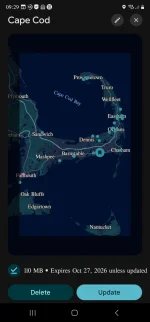
If there are areas you plan to drive in, you can do downloads of map areas before traveling. Checking the expiration dates on my downloaded map areas indicates the data will be stored on the phone for a year or so before it's declared expired, then it'll refresh the data (unless you choose to delete that data set).

You won't get real-time alerts in areas where cell coverage is bad but it'll still allow you to have all the street information for navigation.

I have a bunch of map areas on my phone, each covers a good sized region, super useful.
1000115352.webp
 
Last edited:
If there are areas you plan to drive in, you can do downloads of map areas before traveling. Checking the expiration dates on my downloaded map areas indicates the data will be stored on the phone for a year or so before it's declared expired, then it'll refresh the data (unless you choose to delete that data set).

You won't get real-time alerts in areas where cell coverage is bad but it'll still allow you to have all the street information for navigation.

I have a bunch of map areas on my phone, each covers a good sized region, super useful.
View attachment 24378
Are you suggesting we can download addition maps into the built in Lincoln Google navigation system? I am not asking about Apple CarPlay or Android Auto via a smart phone
 
Are you suggesting we can download addition maps into the built in Lincoln Google navigation system? I am not asking about Apple CarPlay or Android Auto via a smart phone
No, I was replying to angore's post, which was discussing use of AA.

I haven't tried doing map download on the AAOS Maps (the built-in vehicle Maps). If AAOS Maps supports user-selected Offline Maps, it would likely be under Maps - Settings - Offline Maps, similar to an Android phone.
 
Back
Top