

Ill be back in one on tuesdayWhich he doesn't have.
Peter
You are using an out of date browser. It may not display this or other websites correctly.
You should upgrade or use an alternative browser.
You should upgrade or use an alternative browser.
2025 Navigator
- Thread starter Kdean2608
- Start date


In a 2025 loaner for a few days or so. Love it so far. Curious, has anyone figured out how to or if you can display a tachometer on the left display?
chadwx
Member
- Joined
- Dec 13, 2024
- Messages
- 89
- Reaction score
- 30
- Points
- 18
- My Lincoln
- 2025 Lincoln Navigator (Ordered)
In a 2025 loaner for a few days or so. Love it so far. Curious, has anyone figured out how to or if you can display a tachometer on the left display?
I think the only tach display is on Excite mode and can only be in the top middle.
Thanks. I thought of that but had not tried Excite on this vehicle yet. Will do that.I think the only tach display is on Excite mode and can only be in the top middle.
______________________________
chadwx
Member
- Joined
- Dec 13, 2024
- Messages
- 89
- Reaction score
- 30
- Points
- 18
- My Lincoln
- 2025 Lincoln Navigator (Ordered)
I'm hopeful that Lincoln will someday push a software update that allows for a more tradition tach or option for it, instead of just having all that dumb dead space next to the big Google Map on the driver's side.Thanks. I thought of that but had not tried Excite on this vehicle yet. Will do that.
But at the end of the day, the most of the time missing tach is only annoyance #40 of about 60 things Ford did wrong on this "luxury" SUV IMO. UGH.
BigGamerJim
New member
- Joined
- Sep 29, 2023
- Messages
- 26
- Reaction score
- 7
- Points
- 3
- My Lincoln
- 2020 Lincoln Navigator Reserve
I believe the tach is on display during tow mode also.Thanks. I thought of that but had not tried Excite on this vehicle yet. Will do that.
Another thing I have noticed is that the running boards don't extend with the welcome lighting. That is a good idea. Saves the motors and battery as you are near the vehicle and it extends and retracts those umpteen times.
randomuser
Member
- Joined
- Jun 1, 2022
- Messages
- 74
- Reaction score
- 40
- Points
- 18
- My Lincoln
- 2019 Nav L BL / 2023 Nav L BL Sp. Ed. / 2025 Nav L BL
so did they just completely remove the 3 memory options for the passenger seat? me, my wife and a kid used these options all the time on our '19 and '23. now we seem to have to manually change the passengers settings every time someone new sits in the seat. doesn't seem to change when selecting from the 2 created driver profiles we have either.
______________________________
chadwx
Member
- Joined
- Dec 13, 2024
- Messages
- 89
- Reaction score
- 30
- Points
- 18
- My Lincoln
- 2025 Lincoln Navigator (Ordered)
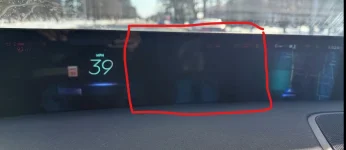
I assume that there isn't anything but "dead space" that can be on the driver's side of the instrument cluster? There's always a big whole between my speed and the google map ... seems like wasted space to me. (my pic isn't the best, but you get the idea)
Attachments
BigGamerJim
New member
- Joined
- Sep 29, 2023
- Messages
- 26
- Reaction score
- 7
- Points
- 3
- My Lincoln
- 2020 Lincoln Navigator Reserve
I wondered the same thing until I towed a trailer. When you are in tow mode, this space is filled in with a graphic of a trailer and shows the degree of grade.I assume that there isn't anything but "dead space" that can be on the driver's side of the instrument cluster? There's always a big whole between my speed and the google map ... seems like wasted space to me. (my pic isn't the best, but you get the idea)
chadwx
Member
- Joined
- Dec 13, 2024
- Messages
- 89
- Reaction score
- 30
- Points
- 18
- My Lincoln
- 2025 Lincoln Navigator (Ordered)
I wondered the same thing until I towed a trailer. When you are in tow mode, this space is filled in with a graphic of a trailer and shows the degree of grade.
Seems a bit silly/odd that it's blank until towing something... and I get why it would want to display that information.
BUT, how many people buy a $120k Navigator to tow?
Then again, it rides as bad as an F250, so maybe it was planned that way?
Don't worry, I'm sure an OTA update will fill all that space in. Like all the OTAs my 2022 has had. <sarc>
______________________________
chadwx
Member
- Joined
- Dec 13, 2024
- Messages
- 89
- Reaction score
- 30
- Points
- 18
- My Lincoln
- 2025 Lincoln Navigator (Ordered)
Don't worry, I'm sure an OTA update will fill all that space in. Like all the OTAs my 2022 has had. <sarc>
HAHA.. I'm guessing all 0 OTAs? I remember hearing Mr Farley brag about that with this pano screen on the new 2025... that they would add requests as they see fit and how easy it would be.
#NeverGonnaHappen
randomuser
Member
- Joined
- Jun 1, 2022
- Messages
- 74
- Reaction score
- 40
- Points
- 18
- My Lincoln
- 2019 Nav L BL / 2023 Nav L BL Sp. Ed. / 2025 Nav L BL
I do not have this dead space. It's all filled in nicely with the speedo and google maps on the drivers side screen. Maybe a config setting somewhere?I assume that there isn't anything but "dead space" that can be on the driver's side of the instrument cluster? There's always a big whole between my speed and the google map ... seems like wasted space to me. (my pic isn't the best, but you get the idea)
chadwx
Member
- Joined
- Dec 13, 2024
- Messages
- 89
- Reaction score
- 30
- Points
- 18
- My Lincoln
- 2025 Lincoln Navigator (Ordered)
I do not have this dead space. It's all filled in nicely with the speedo and google maps on the drivers side screen. Maybe a config setting somewhere?
Very odd... I'm not sure where/how but will have to try and find something... unless, it's just another issue with my Navi. I do have one of the earlier ones that came out in the spring... ?
sixstring
Member
- Joined
- May 23, 2024
- Messages
- 46
- Reaction score
- 34
- Points
- 18
- My Lincoln
- 2024 Nautilus Reserve
Ford is not a technology company. Don't expect anything via downloadable updates.
Nobody buys a ford/lincoln expecting enhanced functionality in the future.
You want a new software feature, buy a new model year.
Nobody buys a ford/lincoln expecting enhanced functionality in the future.
You want a new software feature, buy a new model year.
______________________________

Action
NOT a Junior Member
Have no idea of the percentage to answer the question.Seems a bit silly/odd that it's blank until towing something... and I get why it would want to display that information.
BUT, how many people buy a $120k Navigator to tow?
Then again, it rides as bad as an F250, so maybe it was planned that way?
My 20 YO Navigator was purchase a very long time ago to replace two vehicles. My daily driver and a van I was using to tow a boat and travel trailer.
My Navigator is the Limited Edition and retailed for $80K. I did not pay retail.
I have since replaced the travel trailer with another one.
And still use my Navigator to tow. And the ride of my second gen is still better than anything I have owned in the past or presently own. I own 9 vehicles, but most are collector cars.
Action
Have no idea of the percentage to answer the question.
My 20 YO Navigator was purchase a very long time ago to replace two vehicles. My daily driver and a van I was using to tow a boat and travel trailer.
My Navigator is the Limited Edition and retailed for $80K. I did not pay retail.
I have since replaced the travel trailer with another one.
And still use my Navigator to tow. And the ride of my second gen is still better than anything I have owned in the past or presently own. I own 9 vehicles, but most are collector cars.
Action
I remember test driving an 05 nav with nearly 100k miles and to this day is the smoothest riding suv ive ever driven.
so did they just completely remove the 3 memory options for the passenger seat? me, my wife and a kid used these options all the time on our '19 and '23. now we seem to have to manually change the passengers settings every time someone new sits in the seat. doesn't seem to change when selecting from the 2 created driver profiles we have either.
My wife was upset at this too. We ended up with a 22 and def love the memory settings on the passenger seat.
randomuser
Member
- Joined
- Jun 1, 2022
- Messages
- 74
- Reaction score
- 40
- Points
- 18
- My Lincoln
- 2019 Nav L BL / 2023 Nav L BL Sp. Ed. / 2025 Nav L BL
I wo
I wouldn't expect it if they didn't keep mentioning over the air updates and features... alas, they did say this so being a technology company or not, I expect it when I spend 100K+ on one of their vehicles and they use this in their marketing.Ford is not a technology company. Don't expect anything via downloadable updates.
Nobody buys a ford/lincoln expecting enhanced functionality in the future.
You want a new software feature, buy a new model year.









