2024 Nautilus Tech Issues

discstu37

New member
Joined
Aug 25, 2024
Messages
6
Reaction score
1
Points
3
My Lincoln
2024 Nautilus
I am having a lot of the same issues others have had as it pertains to the interior tech.

First, all Internet connectivity was lost. Holding down the volume crystal for 10 seconds fixed that... For a few days.

Today, I received the "vehicle network connection error". I've read that a hard reset will fix the issue until I get to the dealer - but it's a hybrid vehicle so I'm unsure what needs to be disconnected from the battery. Obviously this is frustrating all the way around, but can anyone point me to how to do a hard reset?

Thank you!
 
Last edited:
I am having a lot of the same issues others have had as it pertains to the interior tech.

First, all Internet connectivity was lost. Holding down the volume crystal for 10 seconds fixed that... For a few days.

Today, I received the "vehicle network connection error". I've read that a hard reset will fix the issue until I get to the dealer - but it's a hybrid vehicle so I'm unsure what needs to be disconnected from the battery. Obviously this is frustrating all the way around, but can anyone point me to how to do a hard reset?

Thank you!
I believe I have seen others report that this Vehicle Network Connection Error usually self-clears after the car sits awhile. Perhaps overnight will help.
 
I believe I have seen others report that this Vehicle Network Connection Error usually self-clears after the car sits awhile. Perhaps overnight will help.
Thanks. Unfortunately I think the battery is going to die before anything else since the interior screens will not turn off. That's why I want to figure out how to do a hard reset, which I believe includes disconnecting the battery.

At the end of the day I've already called concierge and it needs to get to a dealership. The only real question is how quickly they can see it and how much I'm going to have to fight for them to pay for a rental car until I can get it in with a loaner.
 
I would disconnect the battery as a minimum if anything to get the displays to turn off.
______________________________
 
Last edited:
Thanks. Unfortunately I think the battery is going to die before anything else since the interior screens will not turn off. That's why I want to figure out how to do a hard reset, which I believe includes disconnecting the battery.

At the end of the day I've already called concierge and it needs to get to a dealership. The only real question is how quickly they can see it and how much I'm going to have to fight for them to pay for a rental car until I can get it in with a loaner.
You disconnect the 12v battery (this is what powers the interior electronics). Do NOT attempt to disconnect any of the high voltage hybrid components. You should see the 12v battery under the hood to the right. To be sure, look in the owner manual.

Leave the 12v battery disconnected for at least 10 minutes to allow all systems to discharge and hard reset.

Then reconnect the 12v battery. That communication error should go away. You may need to reset some settings, radio presets, etc. or maybe not.

I had the same error, except I have the ICE version of the 2024 Nautilus (Black Label). The hard reset “cured” my problem.
 
You disconnect the 12v battery (this is what powers the interior electronics). Do NOT attempt to disconnect any of the high voltage hybrid components. You should see the 12v battery under the hood to the right. To be sure, look in the owner manual.

Leave the 12v battery disconnected for at least 10 minutes to allow all systems to discharge and hard reset.

Then reconnect the 12v battery. That communication error should go away. You may need to reset some settings, radio presets, etc. or maybe not.

I had the same error, except I have the ICE version of the 2024 Nautilus (Black Label). The hard reset “cured” my problem.
Thank you, this seems to be a common suggestion. My issue is when I tried to do this, the cable that connects to the battery doesn't seem to be long enough for me to get it off the terminal, and I didn't want to force anything. I was able to get the nut off that holds it in place just fine...
 
Thank you, this seems to be a common suggestion. My issue is when I tried to do this, the cable that connects to the battery doesn't seem to be long enough for me to get it off the terminal, and I didn't want to force anything. I was able to get the nut off that holds it in place just fine...
There are retainer clips that hold the cable in place. Did you unclip these?

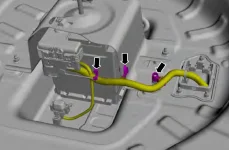
1000008046.webp
 
This looks like the battery in the trunk - I believe the one that controls the computer is under the hood?
I thought we were taking about a hybrid. In that situation, the battery that controls the computer is the 12V battery under the spare tire. If you have a hybrid, I don't know what you're trying to disconnect under the hood. There are jump points for the 12V battery, but that won't disconnect it. There's also the HV drive disconnect under the hood, but you don't want to touch that.

For the ICE, there is no battery under the spare tire. The 12V battery under the hood would have to be the one you're talking about. If you can't remove the cable from the (+) terminal, you can also try removing the cable from the (-) terminal.
 
I may just have a look at the battery under the spare so I do not have to figure it out later in maybe a less convenient time and location.

I have a couple connection instances but they have corrected themselves. I think they are cloud issues. I usually got around them using the phone for navigation. etc.
 
Last edited:
I thought we were taking about a hybrid. In that situation, the battery that controls the computer is the 12V battery under the spare tire. If you have a hybrid, I don't know what you're trying to disconnect under the hood. There are jump points for the 12V battery, but that won't disconnect it. There's also the HV drive disconnect under the hood, but you don't want to touch that.

For the ICE, there is no battery under the spare tire. The 12V battery under the hood would have to be the one you're talking about. If you can't remove the cable from the (+) terminal, you can also try removing the cable from the (-) terminal.
Ah thank you! I thought what was under the hood controlled the computers not the battery under the spare. I appreciate it!
 
My understanding of the hybrids is that the 12v battery provides the electronics power when the vehicle is ‘off’ (so you can unlock, detect approach, check for on-line updates, turn on, etc) then when you turn it on (READY state) the hi voltage battery provides power to charge the 12v battery and the 12v system thru a power converter. I personally would try to avoid having to ‘disconnect the battery’ … any arching could cause damage to electronic components throughout the 12v circuits.
______________________________
 
My understanding of the hybrids is that the 12v battery provides the electronics power when the vehicle is ‘off’ (so you can unlock, detect approach, check for on-line updates, turn on, etc) then when you turn it on (READY state) the hi voltage battery provides power to charge the 12v battery and the 12v system thru a power converter. I personally would try to avoid having to ‘disconnect the battery’ … any arching could cause damage to electronic components throughout the 12v circuits.
Just to clarify, the high voltage system does appear to charge the 12V battery, but it's not charging whenever it is running. That's evident from some of the voltage logs we've seen.
 
Just to clarify, the high voltage system does appear to charge the 12V battery, but it's not charging whenever it is running. That's evident from some of the voltage logs we've seen.
It definitely is not charging as much as it could. I could see every amp divered to changing affects electric miles but can it be that much?
 
These u-tube videos by WeberAuto though a few years old and referencing Toyotas are of the better ones I found so-far explaining Hybrids electrical systems :
 
Just a quick update for everyone - the battery died overnight on its own. When it was jumped this morning, as expected, the car worked as normal, which appears to confirm that a hard reset will in fact get the car operational.

However, the system bug still needs updating. The dealer told me today that last week, an update was released that allegedly fixes this issue. They're flashing it today and I should have it back tomorrow. I'll report back should this issue persist even after the latest update.

Thanks everyone!
______________________________
 
The dealer should do a load test to see if battery is up to specs.
 
I experienced the lost google sign in / lost profile today for the first time...after 4 months. Interestingly , it did not delete my wife's profile that is basically the same as mine setting wise. Since Android Auto worked, no issues with immediate navigation. I am not if position 1 was impacted or not.

Also, the 11.1 in display brightness went to the dim impossible to see mode. I was able to go into the display settings and adjust the offset brightness to get it back. Since I knew the issue, I observed a couple points. When in the dim mode, the brightness control pop up on main display does not show as you increment or decrement the brightness like it did previously On the display settings, the offset shows zero as you move the off set display settings brightness up and down but it will go up and down in brightness. Once I rebooted, the pop up worked for the brightness on main display and then the offset control worked too so display brightness back to

I was on my way to the dealer about an hr away to get some software updates. I asked for all the battery CSPs. In the end, I got 24P08 which I thought I had and 24P22 ABS module. It took less than 30 minutes. I guess I did not need the rest but will check again later,. When I got home, I rebooted the car and heard 4 beeps after the reboot.
 
24P08 is the one that had a second revision of software. You likely got the first one, but not the second.

I had to fight to get the second. 😕
 
24P08 is the one that had a second revision of software. You likely got the first one, but not the second.

I had to fight to get the second. 😕
It did say 24P08 B so maybe B is the second.
 
Back
Top