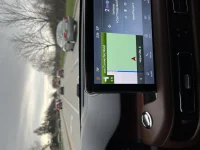
“Night” Display Background Bug - Sync Screen Not Changing to Night Mode

It appears to be an issue Lincoln either isn't addressing or it's not important to them.
I believe that if you represent something is a feature and it doesn't work they should address the issue for a fix. I called Lincoln up and they of cause said there isn't an issue and to have your dealer address it. My dealer isn't getting back to me, but if I don't hear back by today I will go further.
It is an issue if so many on here have experience the problem.
I appreciate the feed back from the members. I will let you know if I do go further what the results were.
Thanks Nyfre!

Please fight the fight! Maybe if we cause enough noise they will address it.

I wish they had some sort of system for owners to log bugs like this so they could address them. Kinda feels like they may not even know about them.
 
Thanks Nyfre!

Please fight the fight! Maybe if we cause enough noise they will address it.

I wish they had some sort of system for owners to log bugs like this so they could address them. Kinda feels like they may not even know about them.
They don’t care , I called
 
Thanks Nyfre!

Please fight the fight! Maybe if we cause enough noise they will address it.

I wish they had some sort of system for owners to log bugs like this so they could address them. Kinda feels like they may not even know about them.
I believe that Ford/Lincoln gets most of the problem info from the dealers when they open a work order for the issue.

Peter
 
I email the ceo of Lincoln/ford and just yesterday received a call from the corporate office.
The young lady said they received my email about the screen issue and will look into the problem, and asked if I could go into it in more detail. I got the impression it wasn't of a concern but she did say she will check it out and get back to me. I total her to check lincoln forum and see that there are others with the same problem. So hopefully they will find the fix. I told them it has to be more in the sensors than the screen because the screen works other features. I will keep you guys posted.
______________________________
 
Hello All
I was able to get a hold of
Executive Representative
Ford Motor Company


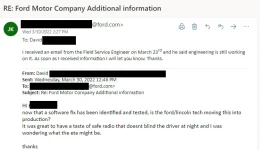
So after many many months Ford tested a "fix" on me in Jan 2022.
What they did was send out a Ford Company tech to load a custom early build of sync 3 software onto my APIM that contained the fix.
Major issue with this special software is it killed off many of my aviator features like massage seats.
But the "fix" did resolve the night time dimming issue.

They ended up restoring my APIM to standard version of sync 3 to get my aviator features working. But that removed the "fix" so i am without it right now.

I adding some screen shots of emails i have with Ford Executive Representative, but removing that name as i don't want to create any friction.

But I will say the Service Manager at my Dealer Fair Oaks Lincoln in Naperville, IL is well aware of the issue.
Please reach out to Tim Nickels tnickels@fairoakslincoln.com, i think the ford field tech was Jeff.
Let him know about your dimming issue so he can let Executive Representative know its not just me making a issue of this.

-------------

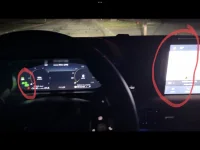
this issue is the radio doesn't check to see if your in night mode (headlights on) if you shifted into drive before the radio boots.

soooo. what that means is if you back into parking spots like i do at home and you start the car at night and go straight into drive the radio stays bright, if you pull over and shift into any gear and back to drive the radio has by now fully booted and changes to night mode.


for those who pull nose in first, when its time leave home the time it takes to start the car and reverse out.... stop the car and change gear to drive allows the radio enough time boot to change into night mode.
I think a majority of people park nose first and this is why they haven't noticed.

added a zip video file showing the issue.
 

Attachments

  • 2022-04-05_13-31-55.webp
    2022-04-05_13-31-55.webp
    34.3 KB · Views: 5
  • changegear.zip
    changegear.zip
    1,011.2 KB · Views: 2
  • drivefirst.zip
    drivefirst.zip
    2.2 MB · Views: 3
  • IMG_0303.webp
    IMG_0303.webp
    38.5 KB · Views: 5
Hello All
I was able to get a hold of
Executive Representative
Ford Motor Company


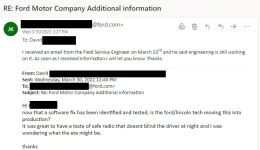
So after many many months Ford tested a "fix" on me in Jan 2022.
What they did was send out a Ford Company tech to load a custom early build of sync 3 software onto my APIM that contained the fix.
Major issue with this special software is it killed off many of my aviator features like massage seats.
But the "fix" did resolve the night time dimming issue.

They ended up restoring my APIM to standard version of sync 3 to get my aviator features working. But that removed the "fix" so i am without it right now.

I adding some screen shots of emails i have with Ford Executive Representative, but removing that name as i don't want to create any friction.

But I will say the Service Manager at my Dealer Fair Oaks Lincoln in Naperville, IL is well aware of the issue.
Please reach out to Tim Nickels tnickels@fairoakslincoln.com, i think the ford field tech was Jeff.
Let him know about your dimming issue so he can let Executive Representative know its not just me making a issue of this.

-------------

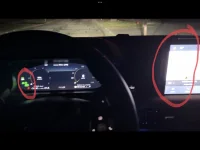
this issue is the radio doesn't check to see if your in night mode (headlights on) if you shifted into drive before the radio boots.

soooo. what that means is if you back into parking spots like i do at home and you start the car at night and go straight into drive the radio stays bright, if you pull over and shift into any gear and back to drive the radio has by now fully booted and changes to night mode.


for those who pull nose in first, when its time leave home the time it takes to start the car and reverse out.... stop the car and change gear to drive allows the radio enough time boot to change into night mode.
I think a majority of people park nose first and this is why they haven't noticed.

added a zip video file showing the issue.


***
I have tried to attach files, every time i do i get error "This message is awaiting moderator approval, and is invisible to normal visitors."
 
..............................................................
I have tried to attach files, every time i do i get error "This message is awaiting moderator approval, and is invisible to normal visitors."
Welcome to the Forum.
wavey.gif

That statement means that a moderator has to approve the post since it most likely at some point may have been recognized by the software that it may contain 'Spam'. As a moderator on the Ford Explorer website, I get notifications regarding these messages and all I have to do is view the post and approve it if it looks good and then the post will show up for all members to see.
As for the display, I noticed that it happens most often as you described. Most of the time I back out but occasionally I will back into the driveway and later pull out nose first. One time I did stop, change gears and go back into drive but that did not clear up the issue.
FYI, I have forwarded your post to the service manager at my dealership.

Peter
 
Last edited:
Maybe it is the fact that none of us are normal? :ROFLMAO:
______________________________
 
images
 

Attachments

  • 2022-04-05_13-31-55.webp
    2022-04-05_13-31-55.webp
    34.3 KB · Views: 12
  • IMG_0303.webp
    IMG_0303.webp
    38.5 KB · Views: 13
I have a bug on my 2020 Aviator where my chosen display background color will not show the correct choice after starting the car.

I have chosen the “tan” color, 4th option on the right, and set the mode to “Night”, which should then always default the background to the darker (essentially black) background.

However, almost every time I start the car, it displays the tan, non “Night” version color. Happens about 90% of the time… but sometimes it will boot up properly into the darker version.

I have noticed that if I put the car in reverse, after it is switched out of reverse and the backup camera goes away, the background color will then display the proper “Night” version.

This is clearly a bug. Has anyone else experienced this? Any fixes you have found other than going into reverse, or going into “Display” settings and pushing the “Night” button again? Any idea of how to get this on Lincoln’s radar to fix?

It’s annoying because I really prefer the look of the black background screen, (during day or night) and just wish it would display properly when I start the car.
I have noticed the same bug as you have described. Two days ago I had my aviator in the shop for a resync of the phone for a key and mentioned the sporadic failure of the "auto" day/night display. When I picked up the car I was told that issue was now working OK. Later that evening after darkness fell there was no change in the daylight brightness display. Today I called the Lincoln way concierge and described that problem. They did not have any solution as well.

Richard Brust
Castle Rock CO
 
I got my wife a 21 Aviator and it has many electrical gremlins. Despite putting it in Auto mode the screen flips a coin several times while driving to determine day or night mode and sometimes even manually selecting does no good. The USB port in the dash also decides when it will work and when it is dead. Sometimes in the morning, the driver's side will defrost and the passenger side will not. Once we were changing highways and the GPS decided it would just keep going in one direction for nearly an hour. We went over hills, dales, lakes, and through houses according to the GPS. Eventually, it clipped back to where it should be. I've already had the dash sensor replaced and the firmware updated. Getting someone in service at my dealership is something of an adventure. I eventually drove over only to be told that I had to make an appointment several weeks out. I was also told that there are "many known issues with our car." I design computers and using the car really isn't an issue but this one may well be destined to meet the lemon law.
 
As I am reading all the problems with the auto feature for day/night mode, which my 2022 Aviator has had the problem since day one, it will early morning when it's dark out, I have pulled my car on the driveway forward and when I leave in the morning it does not change to night mode. My car is in the shop as I am typing this for the third time for this problem. Now I was told engineering has ask the service mgr to plug in a flash drive into the car to check out the data, he is in the middle of doing it and going to send the data back to engineering. I will not know anything until Monday I'm hoping.
______________________________
 
As I am reading all the problems with the auto feature for day/night mode, which my 2022 Aviator has had the problem since day one, it will early morning when it's dark out, I have pulled my car on the driveway forward and when I leave in the morning it does not change to night mode. My car is in the shop as I am typing this for the third time for this problem. Now I was told engineering has ask the service mgr to plug in a flash drive into the car to check out the data, he is in the middle of doing it and going to send the data back to engineering. I will not know anything until Monday I'm hoping.
Let us know what they say.

Thx!
 
I got my wife a 21 Aviator and it has many electrical gremlins. Despite putting it in Auto mode the screen flips a coin several times while driving to determine day or night mode and sometimes even manually selecting does no good. The USB port in the dash also decides when it will work and when it is dead. Sometimes in the morning, the driver's side will defrost and the passenger side will not. Once we were changing highways and the GPS decided it would just keep going in one direction for nearly an hour. We went over hills, dales, lakes, and through houses according to the GPS. Eventually, it clipped back to where it should be. I've already had the dash sensor replaced and the firmware updated. Getting someone in service at my dealership is something of an adventure. I eventually drove over only to be told that I had to make an appointment several weeks out. I was also told that there are "many known issues with our car." I design computers and using the car really isn't an issue but this one may well be destined to meet the lemon law.
Welcome to the Forum Pete. 👋
I have had the day/night issue a few times myself but not with the GPS which has always been correct.

Peter
 
The gps just happened to me last week too.
adding image of it showing me in the grass not the road.


also after 6 months of waiting for ford to release the night day patch i have given up.
please try your luck contacting karen jones


To: Jones, Karen (K.) <kjone315@ford.com>
Subject: Re: Ford Motor Company Additional information


Hi Karen
are there any updates to when the software update will be available?
Its been 6 months since a fix as discovered.
 

Attachments

  • IMG_6586.webp
    IMG_6586.webp
    86.6 KB · Views: 13
On the GPS thing, if it is Sync 3, I assume so, do a Sync reset while driving, and it will correct it. Shouldn't have to, but it is what it is.

Radio power button and right seek, hold down ~10 seconds til screen goes black and logo reappears.
______________________________
 
Day/night issue as described above, occasionally as well. My solution has been one "down" down click on the dash illumination buttons next to the headlight switch. Annoying but cures problem without a stop/start, etc.
 
Auto mode for the screen: The dealership had my 2022 aviator for a week and what the came up with is they had a flash drive and took down all the data and sent to the factory. The factory said they will get back to the dealer but they seem to think it's in the software. My service mgr said he discovered, it you turn the head light switch out of the Auto mode and back on the auto mode on the screen will work. Have not tried that yet. I'm in the opinion Lincoln doesn't have clue and you will hear back from the engineers in Ford like I will. So I will live with it. I'm not one who likes not getting every for what I a paid for, so I will bug the dealer and the rep from Ford
 
Day/night issue as described above, occasionally as well. My solution has been one "down" down click on the dash illumination buttons next to the headlight switch. Annoying but cures problem without a stop/start, etc.
Nice find! Thank you for sharing. This worked for me too.

I have found that after switching to reverse, it will also “cure” the problem, as well as hitting the camera button to display the backup/top down cam on screen works as well.
 
.......................................

I have found that after switching to reverse, it will also “cure” the problem, ...............................................
I tried that as well but found it didn't always work. Neither did the stop and start. Never tried the camera 'thing'.

Peter
 
Back
Top