Mac Computers do not accept Sync 3 updates

My Corsair is supposed to do the same thing but I haven't been able to get close enough to wifi to try it.

Hi Steve. Just to avoid confusion here: Your 2021 Corsair does not have SYNC 4 with OTA (Over The Air) update capability. It has SYNC 3.4, which does not have OTA capability.
In fact, even the 2022 Corsair is not yet equipped with SYNC 4.

SYNC 3.4 does not have OTA (Over The Air) update capability. It does have SYNC updates via WiFi update capability, if connected to a strong WiFi network signal. However, OTA and WiFi update capabilities are two very different things.

Good luck.

EDIT- Several of us were responding at the same time and providing the same information.
 
Yes, 3.1 stick,Utility/Erase, and reformat as EXFat. Then unzipped using Unarchiver. then the unarchived folder,
5U5T-14G381-ET is copied to the stick. Then the folder is opened (I've tried this both ways) to reveal:
Autoinstall
Dontindx
and the folder SyncMyRide
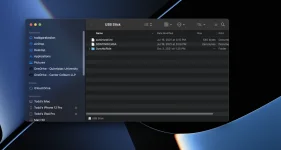
Start the engine and insert the stick.View attachment 12093
Well that all sounds correct.... Might try a new stick -- I mean a never used brand new stick fresh from Staples or Amazon. Just make sure it's at least 8GB and preferably 16 or 32GB.
 
Well, shucks folks. I think I'll just forget this. Unless something serious occurs, like me getting lost, I'm just going to move on. Thanks for all the help.
______________________________
 
Well, shucks folks. I think I'll just forget this. Unless something serious occurs, like me getting lost, I'm just going to move on. Thanks for all the help.
I hear you. I just use the radio for SiriusXM so I can listen using the car speakers. I'll sync my phone occasionally. Maybe the USB will still work for just music. I'll update. '22 Delivery in the next three weeks.
 
Well, shucks folks. I think I'll just forget this. Unless something serious occurs, like me getting lost, I'm just going to move on. Thanks for all the help.
Hold on... From your explanation above, you said you dragged the unzipped folder to your stick then opened the folder (that is now on the stick). That is not right. You want to open the extracted folder on your desktop, then drag the contents to the stick. In other words, you want the Autoinstall, Dontindx files, and SyncMyRide folders on the ROOT of the stick (not in a folder).
 

Attachments

  • Screen Shot 2021-12-29 at 4.15.34 PM.webp
    Screen Shot 2021-12-29 at 4.15.34 PM.webp
    40 KB · Views: 5
Hold on... From your explanation above, you said you dragged the unzipped folder to your stick then opened the folder (that is now on the stick). That is not right. You want to open the extracted folder on your desktop, then drag the contents to the stick. In other words, you want the Autoinstall, Dontindx files, and SyncMyRide folders on the ROOT of the stick (not in a folder).
Disregard.

I thought he said in Post 13 he unzipped using Unarchiver.
 
Disregard.

I thought he said in Post 13 he unzipped using Unarchiver.
No, don't disregard.

He did say that. Unzip the downloaded zip file on the desktop or in the downloads folder using unarchiver, then move the contents of the unzipped folder (Not the folder itself) to the USB drive. Result should be the contents of the unzipped folder at the top (Root) of the USB stick file hierarchy.
______________________________
 
No, don't disregard.

He did say that. Unzip the downloaded zip file on the desktop or in the downloads folder using unarchiver, then move the contents of the unzipped folder (Not the folder itself) to the USB drive. Result should be the contents of the unzipped folder at the top (Root) of the USB stick file hierarchy.
Sorry, I had typed a different response and then deleted it. Not sure why I said disregard but I didn't mean disregard your comment. Sorry for the confusion.

Yes, I see here he said that. Would definitely cause a problem.
 
Hold on... From your explanation above, you said you dragged the unzipped folder to your stick then opened the folder (that is now on the stick). That is not right. You want to open the extracted folder on your desktop, then drag the contents to the stick. In other words, you want the Autoinstall, Dontindx files, and SyncMyRide folders on the ROOT of the stick (not in a folder).
Thought I explained it but...I did everything on the Mac and then dragged the files to the stick.

I unzipped the downloaded Zip file using Unarchiver. Then the unarchived folder, 5U5T-14G381-ET was copied to the stick, and then the folder was opened (I've tried this both ways)
Both ways mean that I dragged the folder first, and then dragged the files in a second attempt. I think I'm doing it right but at this point, I'm not sure of anything.
Autoinstall
Dontindx
and the folder SyncMyRide
Start the engine and insert the stick.
 
OK, here's what I'm going to do, as per tgara

"You want to open the extracted folder on your desktop, then drag the contents to the stick. In other words, you want the Autoinstall, Dontindx files, and SyncMyRide folders on the ROOT of the stick (not in a folder)."

I'll let you know, can't do it right now
 
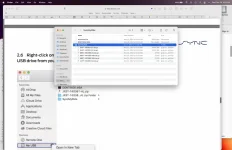
Steve, I'm not sure why you are dragging the unzipped folder back in to the USB, if I am understanding you correctly. This is what my USB looks like:

Screen Shot 2021-12-29 at 4.59.50 PM.webp
______________________________
 
No, I'm doing the same thing you are. I download the Zip file to my downloads folder, unzip it using the unarchiver.app required by lincoln and then drag the unzipped files to the thumb drive:
autoinstall
dontindx
and the folder, SyncMyRide

The only remaining option would be whether I open the SyncMyRide folder to display the file. Your choice seems to be open but I gather Lincoln leaves that folder closed.
 
No, I'm doing the same thing you are. I download the Zip file to my downloads folder, unzip it using the unarchiver.app required by lincoln and then drag the unzipped files to the thumb drive:
autoinstall
dontindx
and the folder, SyncMyRide

The only remaining option would be whether I open the SyncMyRide folder to display the file. Your choice seems to be open but I gather Lincoln leaves that folder closed.
Okay. Yes, I only opened it to show the files in there.

This is a real head scratcher.
 
Well, after all this, Sync accepted my thumb drive. I have no idea what changed. The only explanation I can offer is that the Corsair was in the shop today for a new battery. Only 500 miles...go figure. Anyway, it is possible the system would not let me update because the battery was not up to spec. It was affecting the Auto Start/Stop function. Anyway, the S/S works AND the Sync update loaded without a hitch. I'm a happy camper.
 
Yes that was probably it. Glad it is resolved and we can all fall back in love with our Macs. :)
______________________________
 
Well, after all this, Sync accepted my thumb drive. I have no idea what changed. The only explanation I can offer is that the Corsair was in the shop today for a new battery. Only 500 miles...go figure. Anyway, it is possible the system would not let me update because the battery was not up to spec. It was affecting the Auto Start/Stop function. Anyway, the S/S works AND the Sync update loaded without a hitch. I'm a happy camper.
I agree with BL, the problems you were experiencing were likely due to a low battery charge. Cars nowadays are quite sensitive to low voltage.

Glad it is all fixed! Let us know how you like your new ride!
 
I agree with BL, the problems you were experiencing were likely due to a low battery charge. Cars nowadays are quite sensitive to low voltage.

Glad it is all fixed! Let us know how you like your new ride!
tgara,
It's a totally different experience after driving Explorers for the past twenty years, but I'm really enjoying the Corsair. It's very quiet but solid and super comfortable. In one respect it's several steps down from the Platinum but it's nice to be rid of the truck.

However, when we emptied the Explorer there wasn't any place to put all our stuff in the Corsair. Flat out, the lack of storage space is its biggest fault. I knew we wouldn't have lots of room, but I didn't realize I'd have to put a plastic box in the back to store our stuff.
But, hey, we'll get used to it. Still a great vehicle.
 
tgara,
It's a totally different experience after driving Explorers for the past twenty years, but I'm really enjoying the Corsair. It's very quiet but solid and super comfortable. In one respect it's several steps down from the Platinum but it's nice to be rid of the truck.

However, when we emptied the Explorer there wasn't any place to put all our stuff in the Corsair. Flat out, the lack of storage space is its biggest fault. I knew we wouldn't have lots of room, but I didn't realize I'd have to put a plastic box in the back to store our stuff.
But, hey, we'll get used to it. Still a great vehicle.
The comparable vehicle to the Explorer is the Aviator. I'm not surprised the Corsair has less storage. I hope you enjoy it!
 
tgara,
It's a totally different experience after driving Explorers for the past twenty years, but I'm really enjoying the Corsair. It's very quiet but solid and super comfortable. In one respect it's several steps down from the Platinum but it's nice to be rid of the truck.

However, when we emptied the Explorer there wasn't any place to put all our stuff in the Corsair. Flat out, the lack of storage space is its biggest fault. I knew we wouldn't have lots of room, but I didn't realize I'd have to put a plastic box in the back to store our stuff.
But, hey, we'll get used to it. Still a great vehicle.
lol, but dang, yall came down TWO classes. Yes, I'd expect the shock. lol. Nautilus is a middle ground, but if the backseat isnt used often, I think it will work out with the seats folded down.
 
Back
Top