Turn off warnings when in car wash

Corsair Owner

New member
Joined
Aug 26, 2023
Messages
2
Reaction score
0
Points
1
My Lincoln
2023 Corsair
2023 Corsair:
How do you turn off the side sensor warnings when in a car wash? Also how do you turn off the front sensor warning when pulling into your garage?
 
2023 Corsair:
How do you turn off the side sensor warnings when in a car wash? Also how do you turn off the front sensor warning when pulling into your garage?
Why would you want to turn off front sensor for garage? Mine doesn't alarm until I've essentially hit what's in from of me.
 
My garage space is a bit on the tight side, hence the sensors always alarm when I'm entering and leaving the garage. To my knowledge, these can't be turned off. I have not seen any settings related to those sensors....but I may be wrong?
 
Why would you want to turn off front sensor for garage? Mine doesn't alarm until I've essentially hit what's in from of me.
I have a string hanging down to tell me when to stop. At that point I am eighteen inches away from the shelves at the back of my garage. I previously had an MKZ, and I turned off the alarm before I even entered the garage. I prefer not to hear the warning sounding off, even if it is for only five or ten seconds.
______________________________
 
I love the automatic turning on of the front camera when you get close to an object at the front of the vehicle when parking. So, overall, I like the way the sensors work. It is too bad our '22 doesn't do the same.
 
I love the automatic turning on of the front camera when you get close to an object at the front of the vehicle when parking. So, overall, I like the way the sensors work. It is too bad our '22 doesn't do the same.
Another neat feature I may eventually get to enjoy. It is now a little over 7 months since my order was accepted by Lincoln with no schedule.
 
2023 Corsair:
How do you turn off the side sensor warnings when in a car wash? Also how do you turn off the front sensor warning when pulling into your garage?
Question 1:
On main screen touch Lincoln symbol top left to bring full screen up. Then touch features. Then driver assistance. Scroll down and turn off cross traffic alert. Can also turn off blind spot if you want there.
Question 2:
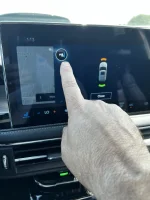
As you approach something the sensor screen pops up. Top left in drive you’ll see the ‘P’next to a cone as in pic. That’s your parking sensor tab. Touch it. It’ll turn them off. In reverse you’ll see same symbol on screen. However every time you shift gears it defaults back to on. In not sure how to permanently turn them off. It’s probably a liability issue as well as preventative.
See pic
CB3CED82-ED0E-40C3-9EDE-6DCD8114C29F.webp

Here’s my question. What kind of salespeople are y’all dealing with?
Did they not go over car with you? Did they not send a New Vehicle Orientation guide? Did they not tell you owners manual is built into the system and accessible thru main screen? Do you not have their cell number to call for answers like this?
So many threads tell me it was ‘here’s your keys. See you later.’ or you yourself were in too much of a hurry to sit and go thru it upon delivery.
 
Here’s my question. What kind of salespeople are y’all dealing with?
Mostly slick-talking know-nothing punks that want to make a sale and move on to the next customer. Roll, roll, roll the units, baby!

In my experience the sales folks generally know nothing about the vehicles. Which is fine, I want them to facilitate the sale. I’ve long given up looking to them for information about the products. In most situations, I know more than they do.
______________________________
 
Last edited:
Back
Top