Navigation underwhelming

Kevbol

Member
Joined
Jun 13, 2023
Messages
39
Reaction score
29
Points
18
Location
Central PA
My Lincoln
2025 Lincoln Aviator Reserve ll 201A Jet Appearance Pristine White Met
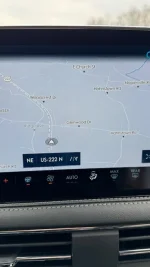
I came from a 2020 Ford Explorer to a 2023 Lincoln Corsair. The navigation screen is gray and white which is pretty boring and ugly. The green, yellow, or red doesn’t show on the roads to show the pace of traffic on major roads.

The Explorer had an older sync and still had a colored screen and traffic colors.
Am I missing something? I tried every setting possible. Same boring screen.
IMG_4299.webp
 
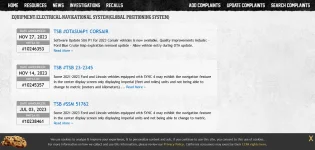
Try to have the dealer update the software? According to the TSB's, there's been a couple upgrades.

Hope this helps.


Screenshot 2024-02-04 at 13-01-23 2023 Lincoln Corsair TSBs CarComplaints.com.webp
 
Yes, it’s rather boring in mostly grey and white, however, when you do punch in a destination, if the route doesn’t have any backups, the roads on your route is colored blue. If there’s a slowdown, that part of the route is yellow, and if traffic is very heavy, that part of the route is red. Unlike WAZE, if you don’t put in a destination, you don’t get any of the live traffic info.
 
Yes, it’s rather boring in mostly grey and white, however, when you do punch in a destination, if the route doesn’t have any backups, the roads on your route is colored blue. If there’s a slowdown, that part of the route is yellow, and if traffic is very heavy, that part of the route is red. Unlike WAZE, if you don’t put in a destination, you don’t get any of the live traffic info.


I didn’t notice you need to be on a destination for the colored roads to display. I thought it should happen all the time. I usually drive within 50 miles of my house and don’t need directions. I was use to live traffic whenever the navigation was displayed. Which is all the time!
______________________________
 
Yup, WAZE and other systems work that way, but not the embedded Lincoln GPS. If you don’t enter a destination, it’s just a stagnant map of your surroundings.
 
Yup, WAZE and other systems work that way, but not the embedded Lincoln GPS. If you don’t enter a destination, it’s just a stagnant map of your surroundings.
On my 2023 Reserve, the map's road changes color for slow traffic (red) on the freeway even when I do not put in a destination. I didn't realize this and got caught in a horrible back-up JUST after I passed an exit.
 
I turned on Apple car play and I now have a beautiful color map that shows live traffic all the time. No more boring grey map.

I'm glad yours works without a destination.
 
Wait. So on the Lincoln nav, is traffic supposed to show at all times or not?
______________________________
 
I would say NO….Traffic does not show on my Lincoln NAV screen unless I have entered a destination. This is not to confuse the Lincoln factory installed system with the others available through apps on your phone such as WAZE, Goggle Maps, etc which do show live traffic on my screen without entering a destination. I have a 23 Reserve model.
 
I would say NO….Traffic does not show on my Lincoln NAV screen unless I have entered a destination. This is not to confuse the Lincoln factory installed system with the others available through apps on your phone such as WAZE, Goggle Maps, etc which do show live traffic on my screen without entering a destination. I have a 23 Reserve model.
Same here. Also 23 Reserve.
 
FYI - we also come from a 2020 Explorer ST to our '22 Corsair GT, and the Sync units are identical. The only difference is the screen size itself, and the color scheme.

Sync may not be the best, but works well enough for us 99% of the time. I can use CarPlay on those few times when I think I might need more detailed or "updated" info.

Ken
 
Wait. So on the Lincoln nav, is traffic supposed to show at all times or not?
I see you have a '23 with Sync 4. Can't comment that directly, but I would assume that it functions at least as well as our older Sync 3.

I have traffic indictions (green, yellow, red lines) all the time both in town and on the highway. There are stretches of rural highways where the traffic disappears, of course. The lines are on freeways, and most major arterials in town (Seattle-Tacoma area).

If you are in a moderately well populated areas, I'd check with Sirius/XM to make sure your free 5-year subscription for Traffic and other info is working properly (assuming that comes with Sync 4). Of course, you should make sure your Sync is up to date as well.

Ken
______________________________
 
Sirius Traffic is not offered on 23 Corsairs with Sync 4. I have had this confirmed by both Sirius and Lincoln. Sync 3 and 4 are very different systems and it’s really difficult to make comparisons. In regards to whether the roads your driving on show colored traffic indications on the screen, I can only comment on what My screen shows, and in my 23 Corsair with the most updated Sync 4 system available, the color graphics only appear if, and only if - you have set a destination. If I’m just driving along with my NAV screen on, but have not set a destination, everything on the map shows up in different shades of gray - no colors.
 
Coming from Sync 1.0(?) (2010 Ford Escape) to Sync4 is a really nice major upgrade for me, but I agree the built-in navigation is very plain in comparison. I also don‘t see much in traffic info … it’s strange. Maybe that will change over time(?). It’s very smart and easy to give Lincoln commands using the Sync4 system. I cancelled my Sirius Traffic & Info subscription since that doesn’t work with Sync4 (saving a few bucks a month). It’s nice that Lincoln now offers this type of data for ’free’ (weather/radar, gas stations/prices, food, etc.). Sirius also honored my 3 free months onto my existing subscription.

I finally get CarPlay which I never had before, and I really love it (especially with regards to text messages). It’s nice to now have 4 built-in options for navigation: Lincoln, Maps, Waze and Google Maps. I keep trying each one out to learn the pros/cons of each. It’s funny how CarPlay looks very ‘cartoonish’ though … wish it looked a bit different/refined. I did improve the look of it though with a few tips I learned: 1) Change the Wallpaper under ‘Settings’ (I changed it to solid red background), and 2) I changed Apple Maps to always show using the ‘dark’ theme. These 2 changes alone makes it look a lot better on the screen and less ‘cartoonish’ IMHO.
 
In playing more with the navigation options on Sync4 (Lincoln, Waze, Google Maps, Apple Maps), it’s a shame that both Google Maps and Waze do not show the navigation turns, etc. in both the HUD display on the windshield and on the digital cluster. It does show that for both Lincoln and Apple Maps which is handy and safer in keeping eyes on the road. Not sure if this will change or not for support with both Waze and Google Maps. I like Waze because of the notifications for red lights cameras, speed traps, etc. (note though that I’m a very safe driver! :sneaky: ). Apple Maps has some of those notifications, but not always (doesn’t seem to support as many traps as Waze - Waze seems to be the more complete option). Google Maps shows the traffic like I wish the Lincoln app did (seems to be missing on Lincoln). In any event, will mostly stick with using Apple Maps and Lincoln locally … but on long trips will most likely switch to Waze.

Hopefully it’s just an app update needed to support both HUD and digital cluster (unless Apple Carplay itself has to update to allow this). I also wonder when Carplay 2.0 will be supported and if that would change any of these behaviors.
 
I don't know about CarPlay, but Google Maps and Waze do show direction info in both the HUD and dash on mine (Sync4).
______________________________
 
Interesting … I wonder what the difference could be on our vehicles. To clarify, I can only access Google Maps and Waze within Carplay itself. I have to be in CarPlay in order to access Apple Maps, Waze, and Google Maps … unless there is some other way of using those apps outside of CarPlay(?).
 
Got it … it just dawned on me that you‘re probably using Android Auto before seeing your reply. Must be a shortcoming of CarPlay then on iOS with it doing this for both Waze and Google Maps.
 
Got it … it just dawned on me that you‘re probably using Android Auto before seeing your reply. Must be a shortcoming of CarPlay then on iOS with it doing this for both Waze and Google Maps.
The integration is very good and works well. The latest Sync4 update (6.30) seem to have smoothed out a number of issues with Android Auto (or, perhaps it was the 11.4 update of Android Auto, who knows).
 
Back
Top