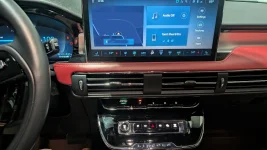
I'm looking to the button press sequences that enter "Engineering Mode" for the main display and the SYNC 4 maintenance menu. Web and "AI" searches all give me sequences that I can't use (like pressing and holding Seek-Right and Volume Down - since I have a "joystick" on the wheel that has both of these functions, I can't hold them both)...
Suggestions?
Thnk you in advance.
Hello and welcome! Frustrating when generic AI searches give you instructions that are physically impossible for your specific steering wheel.
It sounds like you're dealing with two completely different diagnostic menus here, and those generic searches were completely steering you (no pun intended

) wrong on the SYNC 4 sequence. Pressing volume down + seek right is actually the
reboot sequence for the Mustang Mach-E, not the
diagnostic sequence for the Corsair!).
Here are the correct sequences for your Corsair GT:
1. Instrument cluster engineering test mode (ET mode)
This mode tests the gauge cluster, chimes, battery voltage, and raw sensor data.
- With the car completely off, press and hold the OK button on your steering wheel (the center press of the right hand directional pad).
- While continuing to hold OK, press the engine Start button once to turn the ignition to accessory mode (don't put your foot on the brake - you don't want the engine to start).
- Keep holding the OK button for about 5-10 seconds.
- The letters "ET" or "Engineering Test Mode" will appear on the instrument cluster screen. You can then release the OK button and use the up/down arrows to scroll through the hidden menus. To exit, just turn off the vehicle.
2. SYNC 4 / main display maintenance menu (APIM diagnostics)
This menu lets you test the touchscreen, speakers, telematics modem, and view active accessory protocol interface module (APIM) fault codes. Since you can't physically press volume down and seek right on your left joystick at the same time, you have to use the vehicle's secondary sequence.
- Turn the vehicle on (accessory mode or fully running).
- Make sure the audio is turned on (playing the stereo is fine).
- On your steering wheel's left joystick, push and hold to the right (seek right).
- At the same time, press and hold the seek right / skip forward button on your dashboard's physical media/climate control panel below the screen.
- Hold both buttons together for about 10 seconds.
- The screen will suddenly drop into the speaker walk-around rest. Once that starts, you can hit "end test" to back out to the main bezel diagnostics menu.
If you ever actually need to force a soft reboot of your main screen because it freezes, the sequence for the Corsair is to press and hold the physical power button - the center of the dashboard volume knob - along with the seek right button on the steering wheel for 10 seconds until the screen goes black.